Search This Blog

Showing posts with label C#. Show all posts

Wednesday, 30 October 2019

Cross-Platform Unit Testing and Code Coverage with Coverlet

How to check code coverage (using Unit Test cases)

Code coverage and report generation using coverlet (global tool).

Coverlet is a cross-platform code coverage framework for .NET, with support for the line, branch and method coverage. It works with .NET Framework on Windows and .NET Core on all supported platforms.


Steps as below
  • Step 1:Create the SetupGlobalTool.bat file in your project folder.
    Sample path: "C:\YourProjectFolder\BuildCodeCoverageReport\SetupGlobalTool.bat"
  • Step 2: Create the RunCodeCoverage.bat file in your project folder.
    Sample path: "C:\YourProjectFolder\BuildCodeCoverageReport\RunCodeCoverage.bat"
  • Step 3 Execute both file from command prompt respectively.
  • Note: File content provided in below seactions.

SetupGlobalTool.bat


@ECHO OFF

dotnet tool install --global coverlet.console  --ignore-failed-sources

dotnet tool install -g dotnet-reportgenerator-globaltool --ignore-failed-sources

pause

RunCodeCoverage.bat


@ECHO OFF

coverlet "..\TestProjectName\bin\Release\netcoreapp2.2\TestProjectName.dll" --target "dotnet" --targetargs "test ..\TestProjectName\TestProjectName.csproj -c Release --no-build --logger:trx" --threshold 0 --format "opencover" -f json -f lcov  --output "CodeCoverage"

reportgenerator "-reports:CodeCoverage.opencover.xml" "-targetdir:CodeCoverage\Reports"

pause

Note: Create the RunCodeCoverage.bat and SetupGlobalTool.bat file in BuildCodeCoverageReport folder.

Commands

  • Step 1: Install global tools.
    SetupGlobalTool.bat
  • To verify tools has been installed execute below command
    dotnet tool list -g
  • RunCodeCoverage.bat

Note: If command is not recognized, please check the environment variable PATH.

Sample Report

Friday, 11 August 2017

Bad Smells in Code

  • Duplicate code If you see the same code structure in more than one place.

  • Long Method The longer a procedure is, the more difficult it is to understand.

  • Large Class When a class is trying to do too much.

  • Long Parameter List Don't pass in everything the method needs; instead you pass enough so that the method can get to everything it needs.

  • Divergent Change When one class is commonly changed in different ways for different reasons. (You likely have a situation in which two objects are better than one.)

Heads up! When you feel the need to write a comment, first try to refactor the code .so that any comment becomes superfluous.

C# Code Review CheckList

  1. https://azure-blaze.blogspot.com/2017/08/is-renaming-worth-effort.html

  2. https://azure-blaze.blogspot.com/2017/08/bad-smells-in-code.html


Heads up! Any fool can write code that a computer can understand. Good Programmers write code that humans can understand.

Is renaming worth the effort?

  • Good code should communicate what it is doing clearly.

  • Never be afraid to change the name of things to improve clarity.

  • Code that communicates its purpose is very important.

Heads up! Any fool can write code that a computer can understand. Good Programmers write code that humans can understand.

Sunday, 6 August 2017

Error CS0121 The call is ambiguous between the following methods or properties

Compiler Error CS0121 The call is ambiguous between the following methods or properties: 'TestMethod' and 'TestMethod'

The compiler was not able to call one form of an overloaded method. In other word Compiler can not decide which overload method should use.

C# Code

public class Parent
{
    public double Add(int i, double d)
    {
        return (double)i + d;
    }

    public double Add(double d, int i)
    {
        return d + (double)i;
    }
}

Call above function from Main function

static void Main(string[] args)
{
    Parent p1 = new Parent();
    double result1 = p1.Add(1, 2.2); // result1 = 3.2
    double result2 = p1.Add(1.1, 2); // result1 = 3.1
    double result3 = p1.Add(1, 2);   // Get Compiler Error CS0121
    Console.ReadKey();
}

Why function overloading is not based on return type?

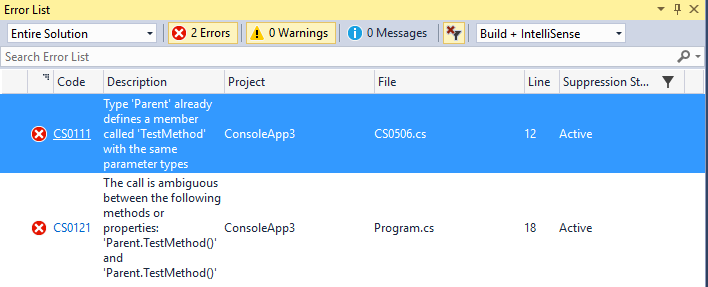
Compiler Error CS0121 The call is ambiguous between the following methods or properties: 'TestMethod' and 'TestMethod'

The compiler was not able to call one form of an overloaded method. In other word Compiler can not decide which overload method should use.

C# Code

public class Parent
{
    public void TestMethod()
    {
        Console.WriteLine("Message from Parent.TestMethod().");
    }

    public string TestMethod()
    {
        Console.WriteLine("Message from Parent.TestMethod() return type string.");
        return string.Empty;
    }
}

Observation

Here, will get 2 error for above C# sample code

Solution

You can resolve above error in the following ways:

  • Specify the method parameters in such a way that implicit conversion does not take place.
  • Remove all overloads for the method.
  • Cast to proper type before calling method.

How to convert char to int?

C# Code

Char.GetNumericValue Method Converts a specified numeric Unicode character to a double-precision floating-point number.

int result = (int)Char.GetNumericValue('1');
// Output
// result = 1

FYI,

Note: Below statement treats the argument as char and returns its ascii value. It is returning the ASCII value of character 1.

int result1 = Convert.ToInt32('1');
// Output
// result = 49

Note: Below statement treats the argument as string and converts the value into Int.

int result1 = Convert.ToInt32("1");
// Output
// result = 1

Saturday, 5 August 2017

Single swap can sort the array?

Program to check if a single swap can sort the array

Solution :
  1. Find the first left incorrect position;
  2. Find first right side incorrect position;
  3. Swap elements;
  4. Check if array is sorted , if not, return false;
public static bool SingleSwapSortArray(int[] input)
{
    int leftIndex = FindLeftIndex(input);
    int rightIndex = FindRightIndex(input);
    if (leftIndex == rightIndex || leftIndex == -1 || rightIndex == -1)
    {
        return false; // check these edge cases just to be on safe side.
    }                
    Swap(input, leftIndex, rightIndex);
    return IsSorted(input);
}

Time Complexity : O(N)

Step 1. Find the first left incorrect position;

public static int FindLeftIndex(int[] input)
{
    for (int index = 0; index < (input.Length - 1); index++)
    {
        if (input[index] > input[index + 1])
        {
            while (index > 0 && input[index] == input[index - 1])
            {
                index--;
            }
            return index;
        }
    }
    return -1;
}

Step 2. Find the first right incorrect position;

public static int FindRightIndex(int[] input)
{
    for (int index = input.Length - 1; index >= 1; index--)
    {
        if (input[index - 1] > input[index])
        {
            while (index < input.Length - 1 && input[index] == input[index + 1])
            {
                index++;
            }
            return index;
        }
    }
    return -1;
}

Step 3. Swap elements;

public static void Swap(int[] input, int leftIndex, int rightIndex)
{
    int temp = input[leftIndex];
    input[leftIndex] = input[rightIndex];
    input[rightIndex] = temp;
}

Step 4. Check if array is sorted , if not, return false;

public static bool IsSorted(int[] input)
{
    for (int index = 0; index < input.Length - 1; index++)
    {
        if (input[index] > input[index + 1])
        {
            return false;
        }
    }
    return true;
}

Complete Program

using System;

namespace SingleSwapCanSortArray
{
    class Program
    {
        static void Main(string[] args)
        {
            int[] input = { 1, 3, 2, 1 };
            Console.WriteLine("Input Array: ");
            foreach (int num in input)
            {
                Console.Write("{0} ", num);
            }
            bool result = SingleSwapSortArray(input);
            Console.WriteLine("\nCan we sort array using single swap: {0}", result);
            if (result)
            {
                Console.WriteLine("Output Array: ");
                foreach (int num in input)
                {
                    Console.Write("{0} ", num);
                }
            }
            Console.Read();
        }
        public static bool SingleSwapSortArray(int[] input)
        {
            int leftIndex = FindLeftIndex(input);
            int rightIndex = FindRightIndex(input);
            if (leftIndex == rightIndex || leftIndex == -1 || rightIndex == -1)
            {
                return false; // check these edge cases just to be on safe side.
            }
            Swap(input, leftIndex, rightIndex);
            return IsSorted(input);
        }

        public static int FindLeftIndex(int[] input)
        {
            for (int index = 0; index < (input.Length - 1); index++)
            {
                if (input[index] > input[index + 1])
                {
                    while (index > 0 && input[index] == input[index - 1])
                    {
                        index--;
                    }
                    return index;
                }
            }
            return -1;
        }

        public static int FindRightIndex(int[] input)
        {
            for (int index = input.Length - 1; index >= 1; index--)
            {
                if (input[index - 1] > input[index])
                {
                    while (index < input.Length - 1 && input[index] == input[index + 1])
                    {
                        index++;
                    }
                    return index;
                }
            }
            return -1;
        }

        public static void Swap(int[] input, int leftIndex, int rightIndex)
        {
            int temp = input[leftIndex];
            input[leftIndex] = input[rightIndex];
            input[rightIndex] = temp;
        }

        public static bool IsSorted(int[] input)
        {
            for (int index = 0; index < input.Length - 1; index++)
            {
                if (input[index] > input[index + 1])
                {
                    return false;
                }
            }
            return true;
        }
    }
}

//Output
//Input Array:
//1 3 2 1
//Can we sort array using single swap: True
//Output Array:
//1 1 2 3

In this example

  1. you will find 3
  2. you will find 1
  3. swap 3,1- > {1 1 2 3}
  4. check if the array is sorted, it's sorted so return true.

Reference

Your Turn

Now it is your turn. Take this sample and implement your own C# program. Leave a comment below telling what you accomplished.

Best wishes on your adventure learning C#!

Creating a NuGet Package Feed to Host Artifacts

Step-by-Step Guide: Creating a NuGet Package Feed to Host Artifacts 🔹 Step 1: Create a C# Class Library and Generate NuG...

Recent Post